Gaming · Pixel art template
Treasure chest Minecraft pixel art template
Build Treasure chest Minecraft pixel art with 222 blocks. View the grid, material quantities, and interactive building guide.
Building grid
18 columns × 16 rows222 blocks total8 materials
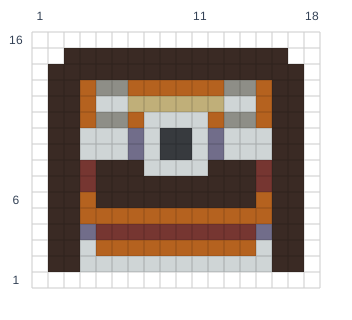
Materials
| Minecraft block | Blocks | Stacks of 64 |
|---|---|---|
| Gray Terracotta | 104 | 1 + 40 blocks |
| Smooth Red Sandstone | 38 | 0 + 38 blocks |
| Light Gray Wool | 8 | 0 + 8 blocks |
| White Concrete | 42 | 0 + 42 blocks |
| Birch Planks | 6 | 0 + 6 blocks |
| Light Blue Terracotta | 6 | 0 + 6 blocks |
| Gray Concrete | 4 | 0 + 4 blocks |
| Mangrove Planks | 14 | 0 + 14 blocks |
How to build Treasure chest
- Choose a size and reserve enough space for the full grid.
- Gather the materials shown above. One square is one Minecraft block.
- Start with the bottom row and build upward, matching each occupied square.
- Leave blank squares empty. Use the interactive guide to zoom and check materials as you build.
Artwork / source credited to Kenney. Original source. CC0 1.0.